How we let an AI assistant edit a live shared itinerary safely
A practical engineering look inside DimTrip: RLS-scoped MCP tools, ordered reviewable edit runs, thread-scoped short handles, zero-AI-turn Undo, and an offline three-way merge outbox.
Updated 29 November 2026
Most "AI trip planners" stop at a chat window: you type a destination, the model outputs six paragraphs of markdown, and you still spend an hour copying places into a spreadsheet or calendar. Giving an AI assistant write access to a real, shared, collaborative database is much more useful — and much easier to break.
In a live multi-user itinerary app, naive LLM tool calls fail in predictable ways: the model hallucinates a 36-character UUID halfway through a 9-step edit, deletes a booked dinner without asking, races against a collaborator who edited the same stop two seconds earlier, or loses track of state when a user reloads the browser tab.
Here is the real architecture we built in DimTrip — including a production mid-trip restructuring failure caught during benchmarking and the concrete guardrails we shipped across our agent, database, and offline sync layers.
1. Treat the AI assistant as just another RLS-scoped writer
DimTrip's chat loop runs server-side in a Cloudflare Worker (apps/agent) so model API keys never reach the browser, but the agent never holds a database service-role key either.
- One shared tool layer: The agent imports our existing zod-validated MCP tool registry in-process — 57 core trip tools (covering trips, days, stops, reservations, expenses, budgets, packing, and checklists), plus 2 optional live web search and retrieval tools when enabled (59 total) — and filters or augments it per session capability.
- Forwarded user JWT + Postgres RLS: Every request carries the signed-in user's Supabase access token. The database enforces the exact same Row-Level Security policies for the assistant as it does for a human clicking in the UI — a viewer cannot trick the assistant into editing someone else's trip, and the blast radius of any prompt injection in pasted travel articles stays bounded by the user's own permissions.
- Realtime propagation plus targeted trip refresh: Agent writes land directly in Postgres and propagate to every open tab over Supabase Realtime, while verified edit-run steps and guarded day deletions also trigger a targeted client refresh of the affected trip (preserving any pending local edits). The assistant behaves like another collaborator without needing a parallel sync backend.
- Reusable prompt prefix: Active screen context (
route,tripId,dayId, visible stops) rides on the latest user message rather than mutating the system prompt, keeping the system prompt and tool schema prefix reusable for prompt caching across comparable turns when session configuration (enabled tools, locale, currency, and date) matches.
2. Ordered, reviewable edit runs (lessons from a real mid-trip failure)
Early versions of our assistant exposed separate tools for deleting stops and shifting start times. On simple one-stop prompts that worked fine. On a realistic multi-step benchmark — extending a London–Edinburgh trip mid-plan in a 9-step declare_plan turn — step 3 failed when the model mistyped a single character in a 36-character destination day UUID while trying to move an Oxford stop, leaving the batch stalled partway through.
Across that incident and earlier testing, three distinct failure modes drove three separate engineering fixes:
- Mistyped raw UUIDs: Asking an LLM to copy 36-character Postgres UUIDs verbatim across multiple tool calls causes occasional single-character typos, failing mid-batch.
- Continuation tool drift: In a mixed turn that combined edits with new-day additions, the follow-up continuation lost access to additive tools and could not finish the planned additions (a separate issue from ordered edit runs, which had already shipped).
- Reload & retry drift: Reloading a tab or recovering from a dropped HTTP response could replay stale confirmation state or leave the transcript disagreeing with Postgres.
We shipped dedicated guardrails for each of those failure modes — ordered reviewable edit runs, persisted reload-safe continuations, continuation tool preservation, and thread-scoped short handles:
- Thread-scoped typed handles: Instead of making the model parrot raw UUIDs, the prompt maps entities to short deterministic handles persisted per thread (such as
tr_a,day_a,s1,e1) that resolve server-side before tool execution. When preparing an edit run, the server separately verifies trip membership and captures reviewed before-snapshots of every affected row. - Server-stored edit runs (
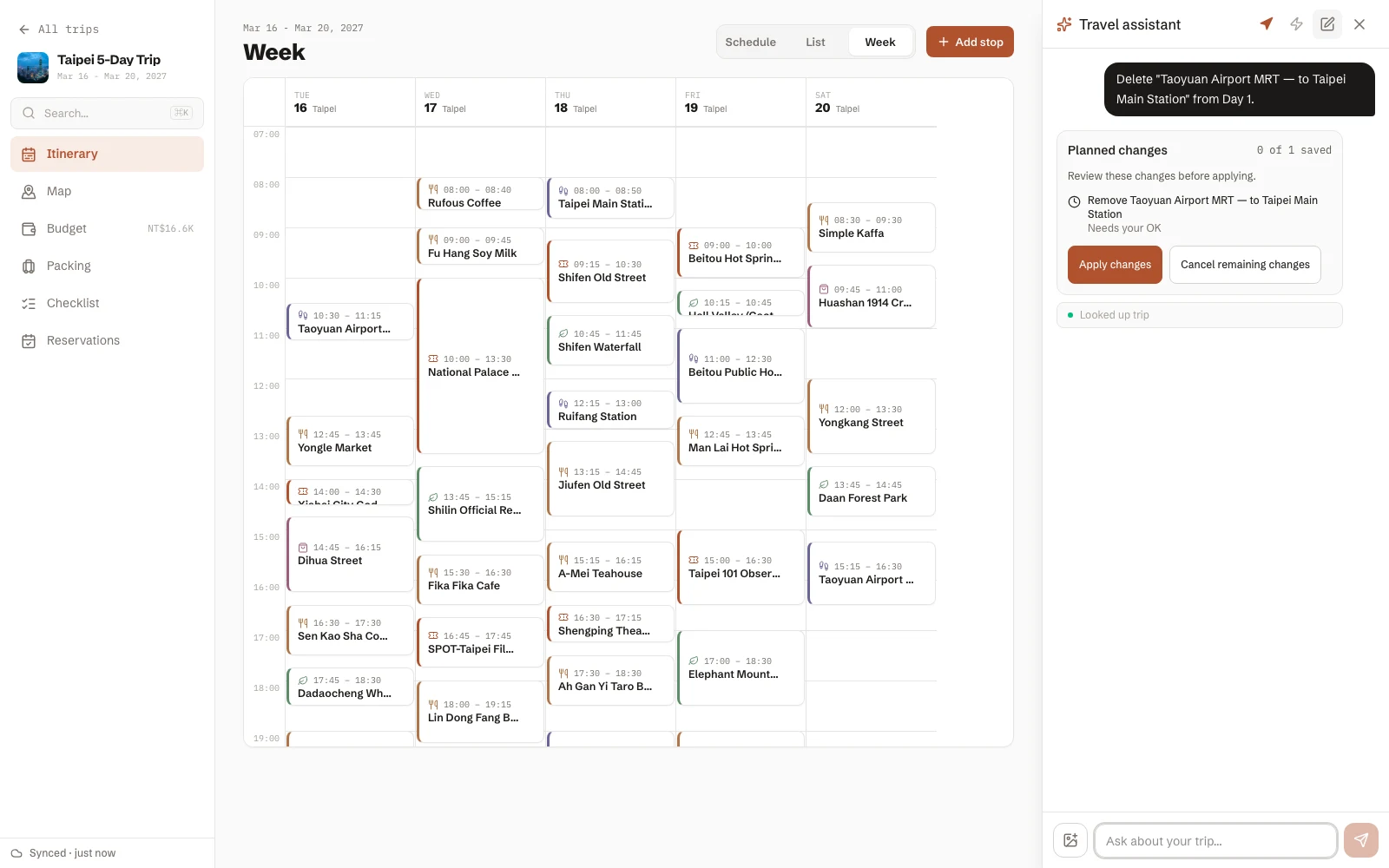
agent_edit_runs): The planning tool (plan_attraction_changes) has no serverexecute. Preparing a run validates thread ownership; once prepared, the planned commands and before-snapshots are immutable, while approval state, run status, and per-step receipts update as execution advances. The browser only has RLS-scopedSELECTaccess to the run table. - Step-by-step atomic commits under a row lock: Deletes are scheduled first, followed by start-time shifts. When the user approves, the server makes up to eight serialized RPC calls; each advance call validates the run owner and current trip edit permission, locks the run row, selects the first unverified step, compares the reviewed server
updated_attimestamp (on both deletes and reschedules), applies the change, verifies the saved row, and commits the step together with its receipt. If a later step fails, earlier verified changes remain saved, the run enterspartial, and Retry skips already-verified steps. - Stored commands on Apply and Retry: Clicking Apply or Retry executes the stored commands directly on the server without asking the model to re-plan. After a dropped network response, the client reads the canonical stored receipt rather than re-running blind; once a live interactive plan settles, the chat can continue the conversation naturally. Reloading a tab never auto-approves a pending run.
3. Human-in-the-loop deletion confirmation + zero-AI-turn Undo
Even with verified step receipts, an AI assistant should never silently destroy a reservation or an hour of manual planning.
- Explicit confirmation for destructive tools: Operations marked with
destructiveHint— deleting stops, days, expenses, or trips, revoking collaborator access (remove_share), and transferring trip ownership (transfer_ownership) — omit a server-sideexecutehandler and wait for an inline Apply / Cancel card by default. (Initial sharing viashare_tripexecutes directly on the server rather than through a destructive gate.) A fresh time-only edit run can auto-apply, and power users can turn on an optional Auto-approve toggle in chat for fresh deletion runs, though restored pending runs after a reload never auto-approve. - One-tap Add back (zero extra AI turns): After you approve a stop or expense deletion, the transcript card renders an Undo button. Clicking Undo never calls the LLM again — it recreates the supported details of that stop or expense directly through the client store under a deterministic UUIDv5 derived from the deleted row's ID. Because it creates a recreated row under a new ID, linked records are not automatically restored or reconnected (for example, an expense's original attraction or reservation link, or expenses cascade-deleted alongside a stop).
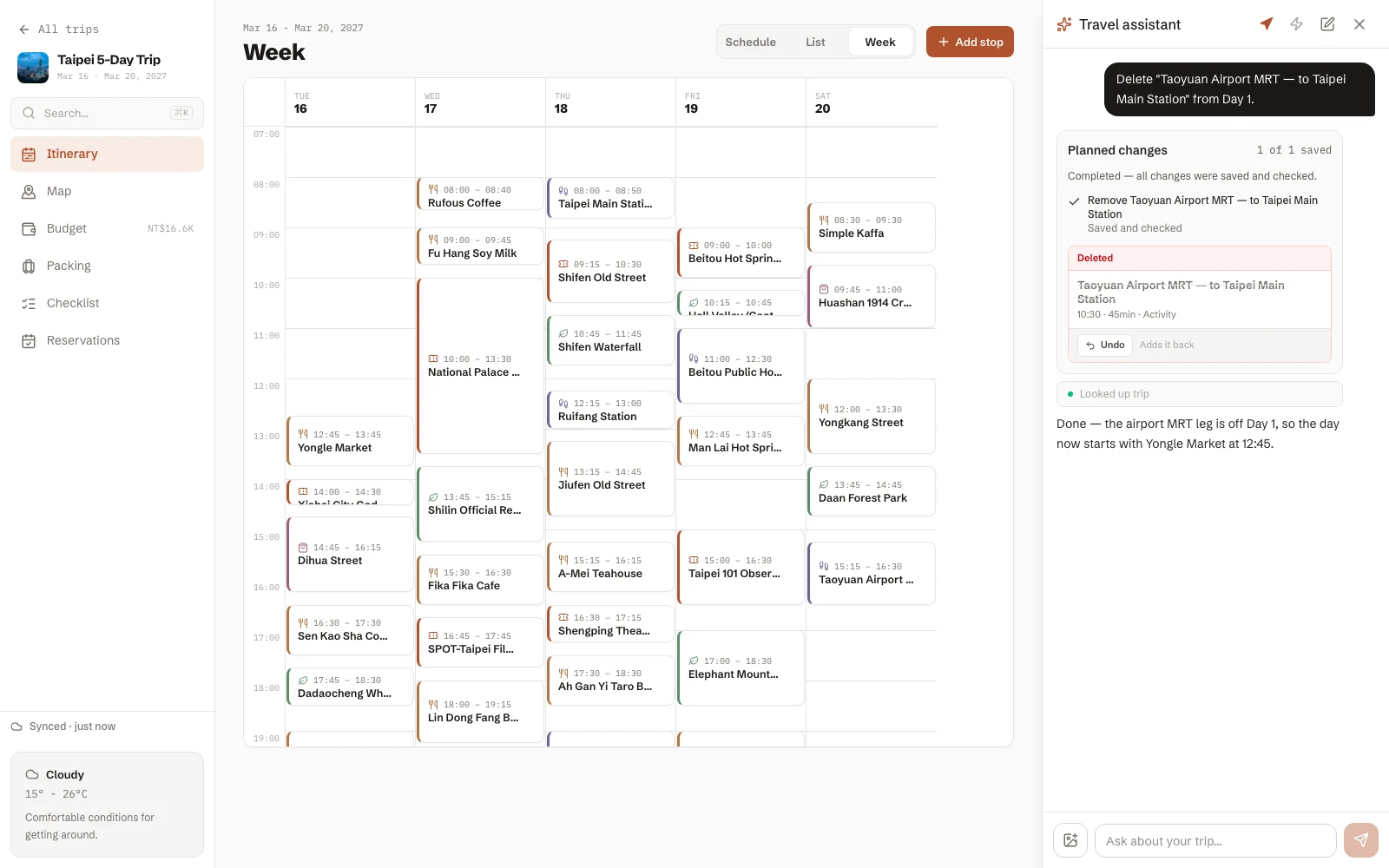
Because the recreated row uses that deterministic UUIDv5, clicking Undo twice cannot insert duplicates, and reloading the browser tab continues to show "Added back" instead of offering a stale Undo button again.
4. Offline writes without silent clobbering (IndexedDB outbox + three-way merge)
Because DimTrip installs as a browser-first PWA, edits can happen when a traveller rides a metro with no signal — while a friend edits the same stop from a hotel lobby.
- FIFO per-user IndexedDB outbox: Queued-capable writes (stops, packing items, and checklists, plus expense updates inside stop workflows) execute directly against Supabase when online and fall back to a per-user IndexedDB queue when offline or on a network
TypeError. Where the browser supports the Web Locks API, adimtrip-outbox-flushlock ensures two open tabs do not replay the same queue concurrently. - Timestamp-guarded conflict detection: Content updates that carry a server-read
updated_attimestamp replay with an optimisticWHERE updated_atguard. If the conditional update matches zero rows, the outbox fetches the latest server row and runs a canonical field-level three-way comparison (base snapshot vs. local payload vs. server row — recursively sorting JSONB object keys so benign key reordering never triggers false conflicts, and skipping conflicts when both sides produced identical values). Dragged order-only stop reorders intentionally queueorder_indexlast-write-wins without a timestamp guard. - Auto-merge safe edits, surface true overlaps in sync status: If you updated a stop's notes offline while your friend changed its start time online, the outbox merges cleanly and retries. If both of you edited the same field, or one deleted a stop the other modified, the entry parks in the sync status indicator so you can open the conflict resolver and choose which version to keep.
- Prompt-based Workbox Service Worker: In Workbox
runtimeCaching, the configured Supabase origin sits first asNetworkOnlyso the service worker never serves stale Supabase API responses or auth tokens from an HTTP cache (app-level local trip snapshots live separately in browser storage for offline reading). UsingregisterType: 'prompt'stops a background deploy from swapping the worker out mid-edit.
Why these guardrails matter to travellers
None of this architecture is meant to show off complexity — it exists so a non-technical traveller can tell an assistant "Tuesday is rainy, swap the afternoon hike for a museum and keep dinner at 19:00" and trust what lands on the screen.
Want to see how the same assistant behaves on a full multi-day trip? Read our Taipei 5-day itinerary or Bangkok and Chiang Mai 7-day itinerary — both include the initial request, real mid-plan chat edits, and follow-up prompts — or compare tools in DimTrip vs Excel and Google Sheets.
Frequently asked questions
- Does DimTrip's AI agent have admin or service-role access to the database?
- No. The agent Worker forwards the signed-in user's Supabase JWT to Postgres on every tool call, so Row-Level Security enforces the exact same permissions for the AI as for a human clicking in the UI. A Viewer cannot trick the assistant into mutating a shared trip.
- Why does DimTrip use ordered edit runs instead of letting the model fire raw updates?
- Multi-step itinerary edits break when an LLM mistypes a 36-character UUID or shifts a time before a prerequisite deletion is approved. DimTrip maps thread-scoped short handles server-side, schedules deletes first, and commits each step and its receipt atomically under a row lock with updated_at checks — if a later step fails, earlier verified changes remain and Retry skips them.
- How does one-tap Undo work without burning another AI turn?
- Clicking Undo on a deleted stop or expense card recreates its supported fields directly through the client store under a deterministic UUIDv5 derived from the old ID, using zero extra AI turns. Linked records (such as an expense's original attraction/reservation link) are not restored, but duplicate clicks are blocked and the Added back state persists across reloads.
- What happens if two collaborators edit the same stop while one is offline?
- Offline edits queue FIFO in IndexedDB (serialized across tabs via Web Locks where supported). Timestamp-guarded content edits replay with a WHERE updated_at guard: non-overlapping field changes auto-merge after a canonical three-way comparison, while true field overlaps park in the sync status indicator for human choice. Dragged order-only reorders queue last-write-wins.
- How does DimTrip stop a PWA service worker update from breaking an active edit?
- Workbox routes the configured Supabase origin as NetworkOnly first so the service worker never serves stale API responses or auth tokens from an HTTP cache (offline snapshots live separately in browser storage), and uses registerType: 'prompt' so a new deployment waits for user confirmation.
More guides
View all guides- How toHow to plan a trip with friends without the group-chat chaosSix steps that turn "we should totally go" into a trip that actually happens, with everyone still friends at the end.
- ComparisonTrip planner apps compared: DimTrip, Wanderlog, Mindtrip & TripItHow five common ways to plan a trip actually compare — desktop and mobile support, AI editing, live group collaboration, offline access, exports and where each tool falls short.
- How toThe hour-by-hour itinerary templateA simple table to copy, four rules of thumb, one filled-in Kyoto day — and how to turn it into a real PDF or Excel (.xlsx) workbook in DimTrip.
- ComparisonDimTrip vs Excel and Google Sheets for trip planningWhere spreadsheets still win, where manual travel sheets start to break down on revision five, and how DimTrip lets you plan with AI and still export a real 9-tab .xlsx workbook.
- ComparisonBrowser & PWA trip planners: why no app store download is neededHow an installable Progressive Web App gives you full desktop planning and phone access with zero App Store friction — plus the honest boundary of what works offline.
- ItineraryTokyo in 5 days, planned by an AI assistantOne request to DimTrip's assistant produced this first visit: food markets, old neighbourhoods, coffee most days and a day trip to Kamakura. Here is the request, the plan and what we fixed in the chat.