Browser & PWA trip planners: why no app store download is needed
How an installable Progressive Web App gives you full desktop planning and phone access with zero App Store friction — plus the honest boundary of what works offline.
Updated 29 November 2026
Most trip planning does not happen on a 6-inch phone screen. It happens on a laptop with twelve browser tabs open — flight searches, museum booking calendars, neighbourhood maps, and hotel reviews. Yet many travel planners force your group into a phone-first App Store download before anyone can even see the schedule.
DimTrip took the opposite route: a browser-first web application that also installs to your phone or desktop as a Progressive Web App (PWA). Here is how a PWA trip planner works in practice, how to install it in ten seconds on iOS, Android, or desktop, what genuinely works offline (and what still needs a connection), and the honest trade-offs compared with native store apps.
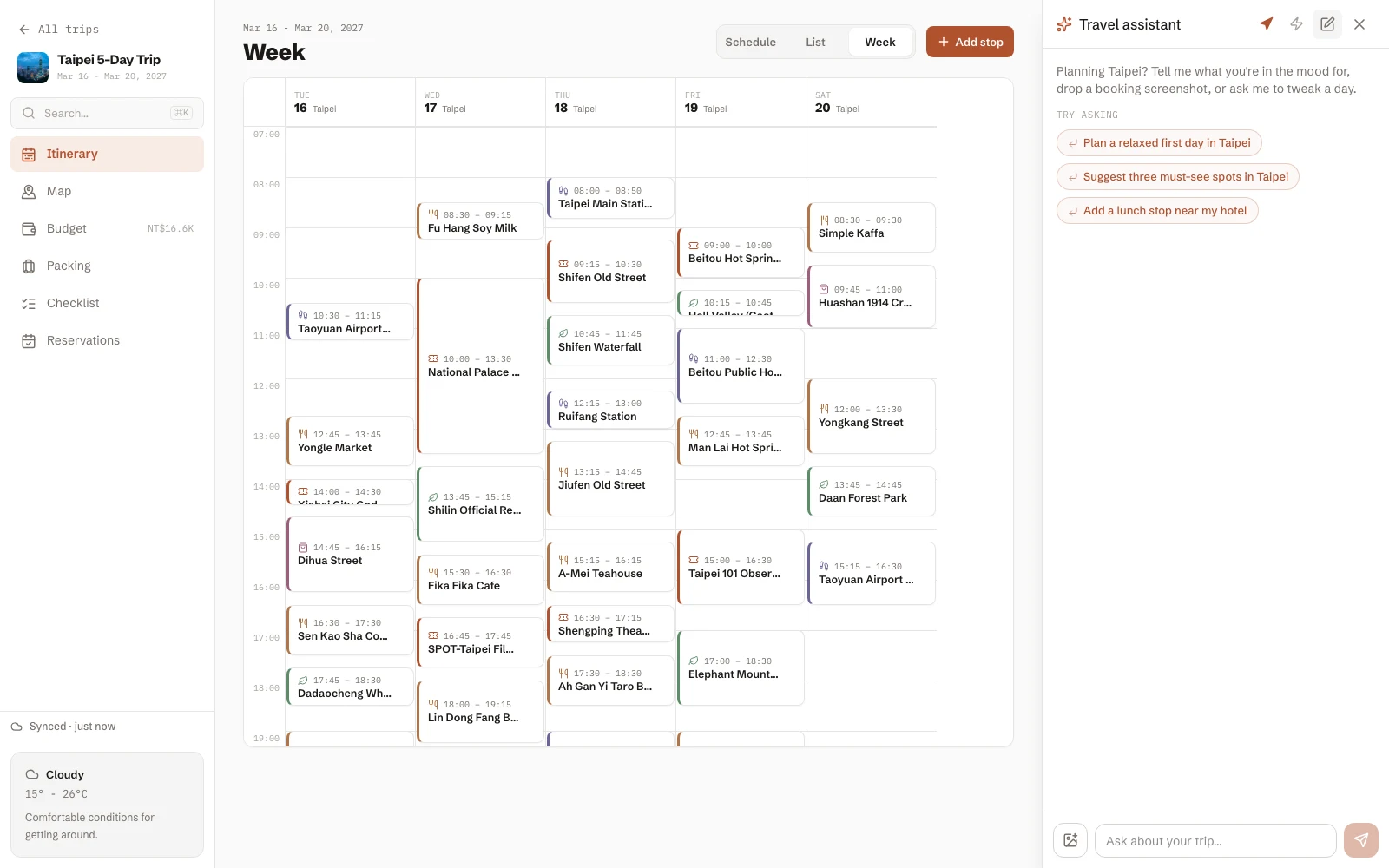
Why browser-first beats phone-only during trip planning
- Desktop screen real estate matters when building a week. Comparing Day 2 against Day 4 side by side, dropping booking PDFs from your downloads folder, and asking the AI assistant to rebalance a crowded afternoon is dramatically faster on a real keyboard and monitor.
- Zero App Store friction for travel companions. When you share a trip link with friends, nobody has to wait for a 150 MB app install or hit a "this app requires iOS 17+" wall just to read or co-edit the schedule.
- Full core workspace parity on Mac, Windows, Chromebook, iOS, and Android. You get the same itinerary, map, budget, and collaboration views on desktop and mobile — you never discover that the web version is missing budgets or that Android gets features three months after iOS.
- Always up to date — without interrupting mid-edit. DimTrip uses a prompt-based service worker update (
registerType: 'prompt'). When a new version ships, your active trip is never refreshed out from under you; you accept the update banner whenever you are ready.
How to install DimTrip to your home screen (no store required)
You can use DimTrip straight in any modern browser, or install it as a standalone PWA icon without the browser address bar:
- iPhone / iPad (Safari): Open
dimtrip.comin Safari, open Share (from the browser toolbar or page menu; tap More on iPad if needed), choose Add to Home Screen, make sure Open as Web App is enabled, and tap Add. - Android (Chrome): Open
dimtrip.com, tap the three-dot menu (or the install prompt banner), and choose Install app / Add to Home screen. On Android Chrome, installing DimTrip also registers it in your phone's Share sheet — so you can share a hotel screenshot or booking PDF from another app straight into DimTrip's AI chat. - Desktop (Chrome or Edge on Mac / Windows / ChromeOS): Open
dimtrip.comand click the Install icon on the right side of the address bar to launch DimTrip in its own app window.
What genuinely works offline — and what still needs signal
Plenty of web apps claim "works offline" when they only show a blank spinner on a subway platform. Here is the exact, honest boundary in DimTrip:
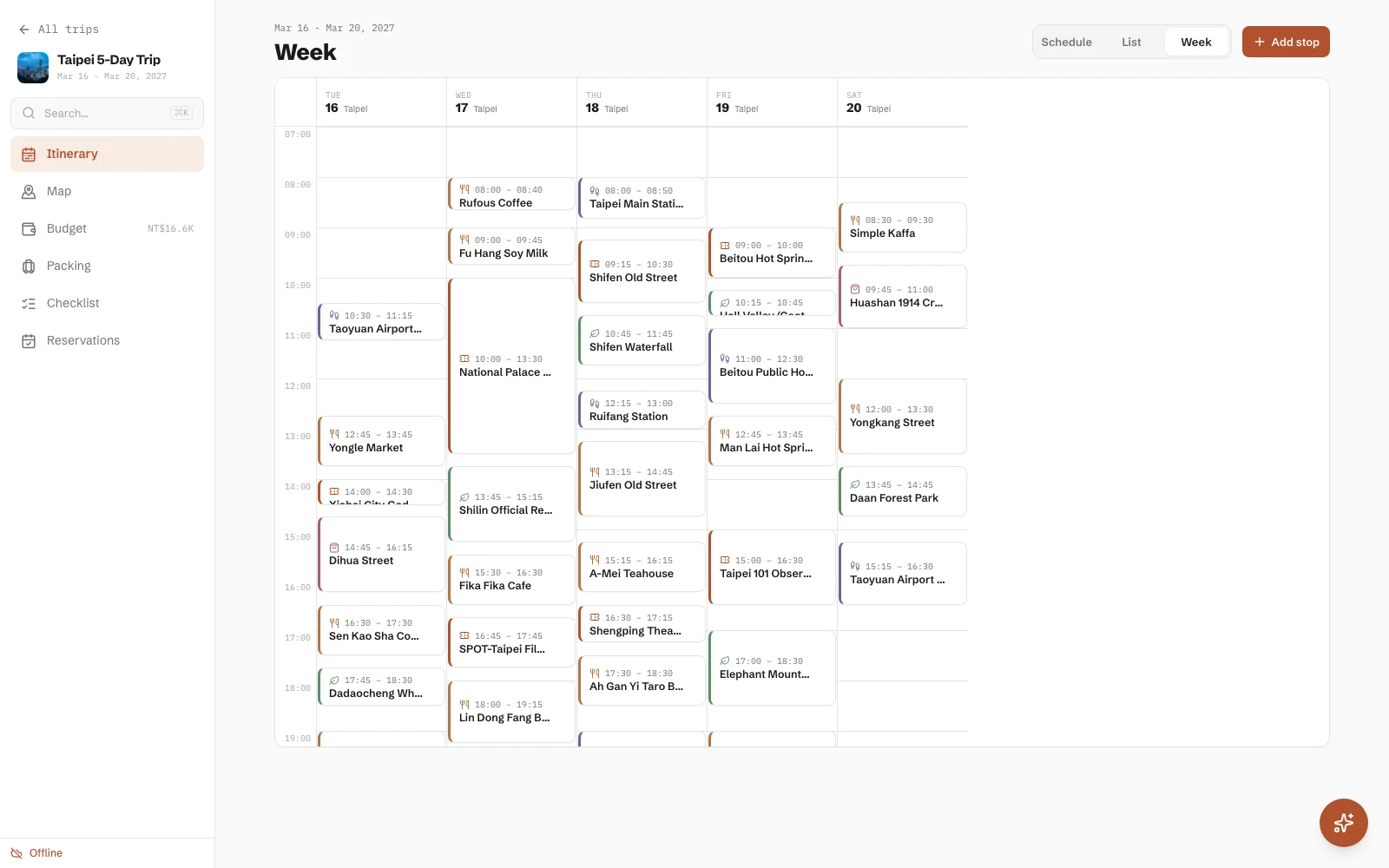
Works offline (open and sync the trip on this device while online first):
- Reading the last synced version of your trip: Days, stops, start times, addresses, notes, reservations, budget totals, packing items, and pre-trip checklists stay cached locally so you can check them in airport immigration queues, underground trains, or rural areas. (Signing out or clearing browser storage removes cached data.)
- Queuing stop, packing, and checklist edits: Checking off packing items, updating checklists, or adjusting stops while offline writes to a durable IndexedDB outbox in your browser (including expense updates inside stop workflows). Once you reconnect, DimTrip replays those changes in order and checks timestamp-guarded edits for concurrent changes from companions.
Still requires an internet connection:
- Standalone expense, budget, and booking edits: Adding standalone expenses, editing budget limits, or saving new booking records requires an active connection to persist to the server.
- AI assistant replies and live web checks: Generating new days, running chat edits, or looking up live opening hours calls the server-side assistant and needs connectivity.
- Uncached map tiles and fresh FX rates: Map tiles you have not viewed before and updated daily exchange rates load when online.
- Signing in for the first time: Your initial login and first trip sync require a network connection.
For long flights or mountain areas where you want a rock-solid zero-signal fallback, click Export before leaving to save a PDF (with a print-friendly photo-free mode) or a 9-tab Excel (.xlsx) copy directly to your phone's Files app. You can inspect an example right now in our DimTrip vs Excel and Google Sheets guide.
Honest trade-offs: where native App Store apps still win
Choosing a PWA over native iOS and Android builds is a deliberate engineering trade-off, not magic. Here is what a native store app can still do better today:
- iOS Share Sheet integration: Apple Safari does not support the Web App Manifest
share_targetAPI yet. Android Chrome users can share booking screenshots straight to DimTrip; iPhone users paste or attach screenshots inside the chat composer instead. - Deep OS integrations: Native apps have more direct access to lock-screen Live Activities for boarding gates and background GPS trip-tracking breadcrumbs, and DimTrip does not currently offer Apple Wallet pass export.
- Public-transit turn-by-turn navigation: DimTrip focuses on itinerary structure, collaboration, budgets, and AI editing rather than replacing Google Maps, Citymapper, or Naver Map for live transit routing.
When a browser + PWA planner is the right call
A browser-first PWA shines when you plan across desktop and mobile, invite friends who mix iPhone, Android, Mac, and Windows, and want full itinerary, budget, and collaboration parity without paying extra for a desktop version or offline viewing.
Compare how DimTrip stacks up against native apps in our trip planner apps comparison, or read the engineering story behind our offline outbox and safe AI edits in how an AI assistant edits a live collaborative trip safely.
Frequently asked questions
- Do I have to download DimTrip from the Apple App Store or Google Play?
- No. DimTrip runs directly in any modern desktop or mobile browser and installs to your home screen as a Progressive Web App (PWA) in seconds — with no store download required.
- How do I install DimTrip on my iPhone or Android home screen?
- On iPhone or iPad, open dimtrip.com in Safari, open Share (via the toolbar or page menu; tap More on iPad if needed), choose Add to Home Screen, enable Open as Web App, and tap Add. On Android Chrome, open the three-dot menu and tap Install app or Add to Home screen, which also adds DimTrip to Android's system Share sheet.
- What actually works offline in DimTrip's PWA?
- Open and sync the trip on your device while online first. Offline, you can read the last synced version (days, stops, times, addresses, bookings, budgets, packing, and checklists) and queue stop, packing, and checklist edits in IndexedDB. Standalone expense, budget, and booking writes still require a connection.
- Does the AI assistant work without an internet connection?
- No. AI itinerary edits, live web checks, standalone expense/budget/booking saves, updated daily FX rates, and uncached map tiles require an internet connection. For zero-signal backups during flights or remote travel, export a PDF or 9-tab Excel (.xlsx) file before leaving.
- What are the trade-offs compared with a native iOS or Android app?
- iOS Safari does not yet support Web App Manifest share_target (so iPhone users attach booking screenshots inside chat instead of the OS Share sheet), and DimTrip does not currently offer Apple Wallet pass export or lock-screen Live Activities.
More guides
View all guides- ComparisonTrip planner apps compared: DimTrip, Wanderlog, Mindtrip & TripItHow five common ways to plan a trip actually compare — desktop and mobile support, AI editing, live group collaboration, offline access, exports and where each tool falls short.
- ComparisonDimTrip vs Excel and Google Sheets for trip planningWhere spreadsheets still win, where manual travel sheets start to break down on revision five, and how DimTrip lets you plan with AI and still export a real 9-tab .xlsx workbook.
- How toHow to plan a trip with friends without the group-chat chaosSix steps that turn "we should totally go" into a trip that actually happens, with everyone still friends at the end.
- How toThe hour-by-hour itinerary templateA simple table to copy, four rules of thumb, one filled-in Kyoto day — and how to turn it into a real PDF or Excel (.xlsx) workbook in DimTrip.
- How toHow we let an AI assistant edit a live shared itinerary safelyA practical engineering look inside DimTrip: RLS-scoped MCP tools, ordered reviewable edit runs, thread-scoped short handles, zero-AI-turn Undo, and an offline three-way merge outbox.
- ItineraryTokyo in 5 days, planned by an AI assistantOne request to DimTrip's assistant produced this first visit: food markets, old neighbourhoods, coffee most days and a day trip to Kamakura. Here is the request, the plan and what we fixed in the chat.